Introduction to Web APIs
July 10, 2021 · 3 min read
If you have any questions, feel free to comment below. Click the block can copy the code.
And if you think it's helpful to you, just click on the ads which can support this site. Thanks!
Strictly speaking, most of what we learned in the JavaScript section belongs to ECMAScript. ECMAScript, or ES, defines language standards such as the syntax rules for variables, data types, expressions, statements, and functions. Browsers implement most of the ECMAScript specification and extend it with practical features. These extensions are called Web APIs.
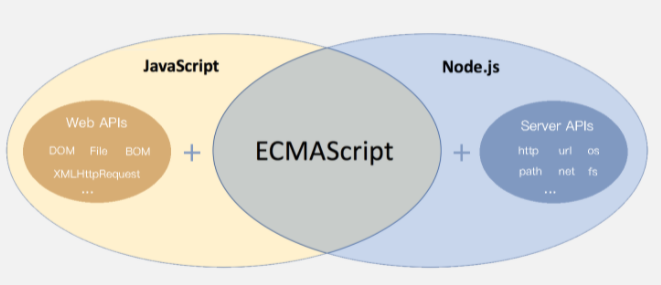
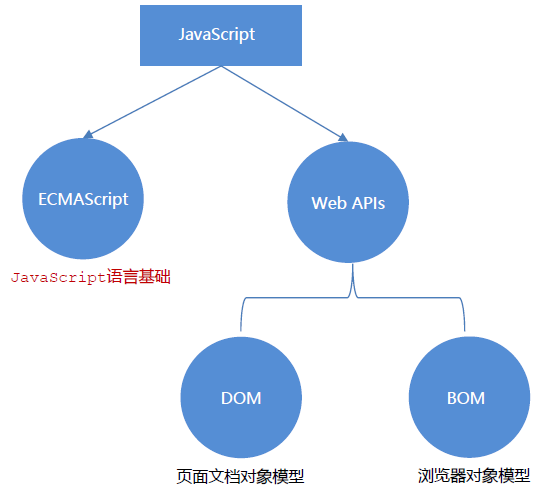
ECMAScript running in a browser together with Web APIs makes up JavaScript as we use it. The core Web APIs are the DOM and BOM.
Further reading: The ECMAScript specification is continually updated and has many versions. Early versions were numbered sequentially, such as ECMAScript 3 and ECMAScript 5. As updates became more frequent, version names began using years, such as ECMAScript 2017 and ECMAScript 2018. ECMAScript 6 was released in 2015 and is often called ECMAScript 2015.
Further reading on the history of JavaScript[1].
The DOM (Document Object Model) is an API for representing and interacting with any HTML or XML document. It treats every element in an HTML document as an object with many properties and methods. Changing these properties or calling these methods dynamically updates the HTML, providing the foundation for visual effects and user interaction on web pages.
In short, the DOM dynamically modifies HTML to create web page effects and user interactions.
Concepts #
DOM Tree #
An HTML document can be represented visually as a tree, called the document tree or DOM tree. The document tree makes the relationships between elements clear.
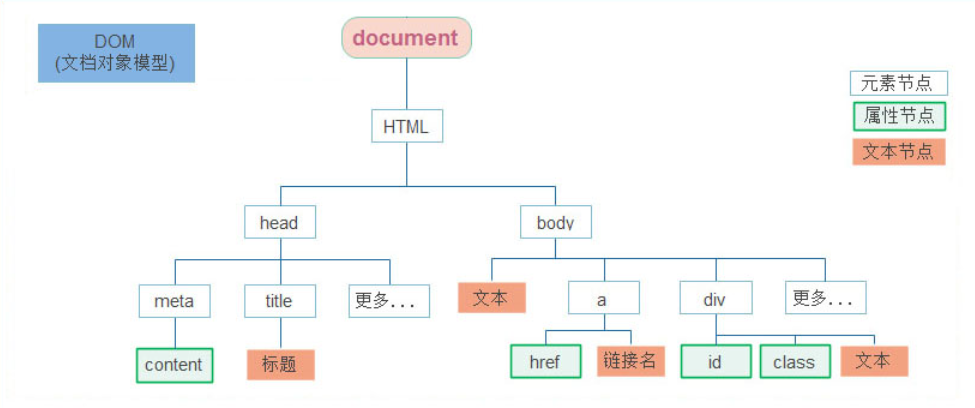
DOM Nodes #
Nodes are the components of the document tree. Every node is a DOM object; common types include element nodes, attribute nodes, and text nodes. (Each node has a corresponding set of properties.)
- Element nodes are HTML tags, such as
head,div, andbodyin the diagram above. - Attribute nodes are attributes of HTML tags, such as the
hrefattribute of anatag or theclassattribute of adivtag in the diagram above. - Text nodes are the text content of HTML tags, such as the text inside a
titletag. - The root node specifically refers to the
htmltag. - Others…
Document #
document is a built-in JavaScript object specifically for the DOM. It has various properties and methods and is central to learning the DOM.
<script>
  // document is a built-in object
  // console.log(typeof document);
  // 1. Get the root node through document
  console.log(document.documentElement); // Corresponds to the html tag
  // 2. Get the body node through document
  console.log(document.body); // Corresponds to the body tag
  // 3. Write content to the page using document.write
  document.write('Hello World!');
</script>
Getting DOM Objects #
The argument must be a string in quotes containing a CSS selector.
querySelector ()returns the first matching element.querySelectorAll ()returns a collection of matching elements: an array-like object (it has a length and numeric indexes but lacks array methods such as pop () and push ()).- Other methods to know:
getElementById(document.getElementByIdretrieves an element node by its tag’sidattribute).getElementsByTagName(retrieves elements by tag name; for example,getElementsByTagName('div')retrieves all div elements on the page).document.getElementsByClassName ( 'w ')(retrieves all elements on the page with the class name w).
<!DOCTYPE html>
<html lang="en">
<head>
  <meta charset="UTF-8">
  <meta http-equiv="X-UA-Compatible" content="IE=edge">
  <meta name="viewport" content="width=device-width, initial-scale=1.0">
  <title>Document</title>
  <style>
    .box {
      width: 200px;
      height: 200px;
    }
  </style>
</head>
<body>
  <div class="box">123</div>
  <div class="box">abc</div>
  <p id="nav">Navigation bar</p>
  <ul class="nav">
    <li>Test 1</li>
    <li>Test 2</li>
    <li>Test 3</li>
  </ul>
  <script>
    // 1. Get the first matching element
    // const box = document.querySelector('div')
    const box = document.querySelector('.box') // Like a class selector
    console.log(box)
    const nav = document.querySelector('#nav') // Like an ID selector
    console.log(nav)
    nav.style.color = 'red'
    // 1. Get the first li inside a ul
    const li = document.querySelector('ul li:first-child')
    console.log(li)
    // 2. Select all li elements
    // const lis = document.querySelectorAll('ul li')
    // console.log(lis)
    // 1. Get the elements
    const lis = document.querySelectorAll('.nav li')
    // console.log(lis)
    for (let i = 0; i < lis.length; i++) {
      console.log(lis[i]) // Iterate over the returned array-like object and output each li element
    }
    const p = document.querySelectorAll('#nav')
    // console.log(p)
    // p[0].style.color = 'red'
  </script>
</body>
</html>
Every DOM object has a nodeType property used to check its node type.
Related readings
- JavaScript Data Types
- JavaScript Objects
- JavaScript Functions
- JavaScript Arrays
- JavaScript Operators and Control Flow
If you want to follow my updates, or have a coffee chat with me, feel free to connect with me: