December 17, 2024
·
7 min read

GnuPG is a complete and free implementation of the OpenPGP standard as defined by RFC4880(also known as PGP). GnuPG allows you to encrypt and sign your data and communications; it features a versatile key management system, along with access modules for all kinds of public key directories. GnuPG, also known as GPG, is a command line tool with features for easy integration with other applications.
This article I will introduce the basic usage of GPG.
Read the full text -> A total of 1.54k words
December 14, 2024
·
5 min read

So after a long time, I decide to restart my blog program. In my daily development, I have a lot of thoughts and ideas, thus I will write some documents to record them. But I believe that sharing is the best way to learn. A specific example is cryptography, which means the closing source algorithm is never the safest. Only algorithms that have been vetted by the public are truly secure.
Read the full text -> A total of 1.06k words
August 28, 2024
·
3 min read
整理常用的 macOS 键盘快捷键与触控板操作。这里的 ⌘ 表示 Command,⌥ 表示 Option,⌃ 表示 Control;有些组合键的效果取决于当前应用及系统设置。
Read the full text -> A total of 0.63k words
August 18, 2024
·
20 min read
基于 NVIDIA AI Endpoint、LangChain 和 FAISS 构建 RAG 智能对话机器人,实践商品问答与检索增强生成。
Read the full text -> A total of 4.03k words
July 14, 2024
·
7 min read
Scalar
#
Scalar variables are denoted by ordinary lowercase letters (for example, $x$, $y$, and $z$). $\mathbb{R}$ denotes the space of all (continuous) real-valued scalars, and $x\in\mathbb{R}$ is the formal way to say that $x$ is a real-valued scalar. A scalar is represented by a tensor with only one element.
Read the full text -> A total of 1.52k words
July 12, 2024
·
1 min read
Reading the Dataset
#
The data is stored in the CSV (comma-separated values) file ../data/house_tiny.csv.
import os

os.makedirs(os.path.join('..', 'data'), exist_ok=True)
data_file = os.path.join('..', 'data', 'house_tiny.csv')
with open(data_file, 'w') as f:
    f.write('NumRooms,Alley,Price\n')  # Column names
    f.write('NA,Pave,127500\n')  # Each row represents one data sample
    f.write('2,NA,106000\n')
    f.write('4,NA,178100\n')
    f.write('NA,NA,140000\n')

# To load the raw dataset from the CSV file we created, import `pandas` and call `read_csv`.
# !pip install pandas
import pandas as pd

data = pd.read_csv(data_file)
print(data)

#    NumRooms Alley   Price
# 0       NaN  Pave  127500
# 1       2.0   NaN  106000
# 2       4.0   NaN  178100
# 3       NaN   NaN  140000
July 12, 2024
·
4 min read
An $n$-dimensional array is also called a tensor. Regardless of the deep learning framework, its tensor class (ndarray in MXNet and Tensor in PyTorch and TensorFlow) is similar to NumPy’s ndarray.
During deep learning training, we usually do not read images one at a time. Instead, we might read 128 images at once. This is a batch, represented by a four-dimensional array.
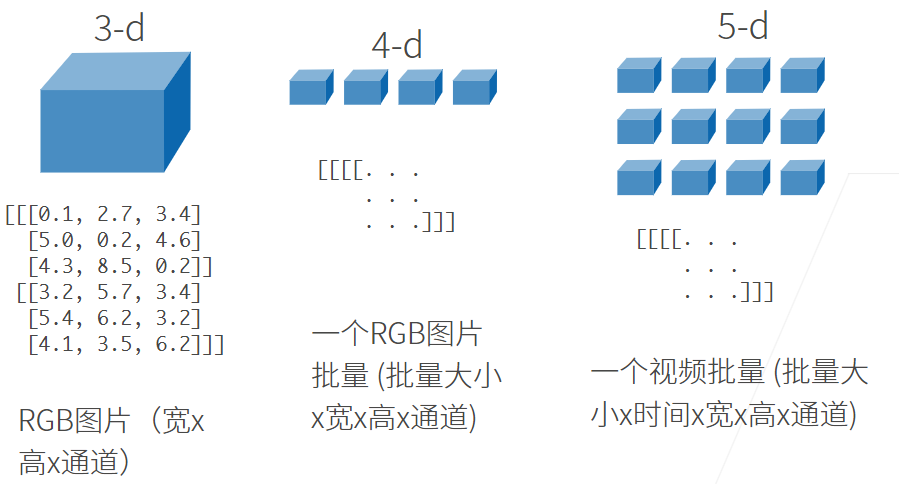 Deep learning frameworks also offer important features beyond NumPy’s
ndarray:
- Strong support for GPU-accelerated computation, while NumPy supports only CPU computation;
- Automatic differentiation in tensor classes.
A tensor with one axis corresponds to a mathematical vector;
A tensor with two axes corresponds to a mathematical matrix.
Read the full text -> A total of 0.92k words
June 22, 2024
·
0 min read
This article will share my must-haves for Macos in order to make my Macos more efficient and comfortable.
Read the full text -> A total of 0.05k words
February 25, 2024
·
3 min read
1. Export data
#
Since R is mainly used for data analysis, import files are more commonly used than export files, but sometimes we also need to export data or analysis results. The functions write.table( ) and write.csv( ) can export data to a .txt file and a .csv file, respectively.
In addition, the function save( ) can save the specified object in the workspace as an R data file with the extension .rdata. For example:
ID <- 1:5
sex <- c("male", "female", "male", "female", "male")
age <- c(25, 34, 38, 28, 52)
pain <- c(1, 3, 2, 2, 3)
pain.f <- factor(pain, levels = 1:3, labels = c("mild", "medium", "severe"))
patients <- data.frame(ID, sex, age, pain.f)
save(patients, file = "patients.rdata")

# IMPORT DATA
load("patients.rdata")
the rdata format file takes up less space and loads quickly with R. Therefore, it is recommended that users ** save data in rdata format ** after importing and organizing data in other formats. To import data in this format, simply call the load( ) function.
Read the full text -> A total of 0.65k words
February 25, 2024
·
5 min read
In real-world problems, data analysts may face datasets with hundreds of thousands of records and hundreds of variables. Processing such large datasets requires a relatively large amount of computer memory, so use a 64-bit operating system and a device with relatively large memory whenever possible. Otherwise, data analysis may take too long or may even be impossible to carry out. In addition, effective strategies for processing data can greatly improve analysis efficiency.
Read the full text -> A total of 1.02k words