Nginx Basics and Minimal Configuration
March 1, 2023 · 5 min read
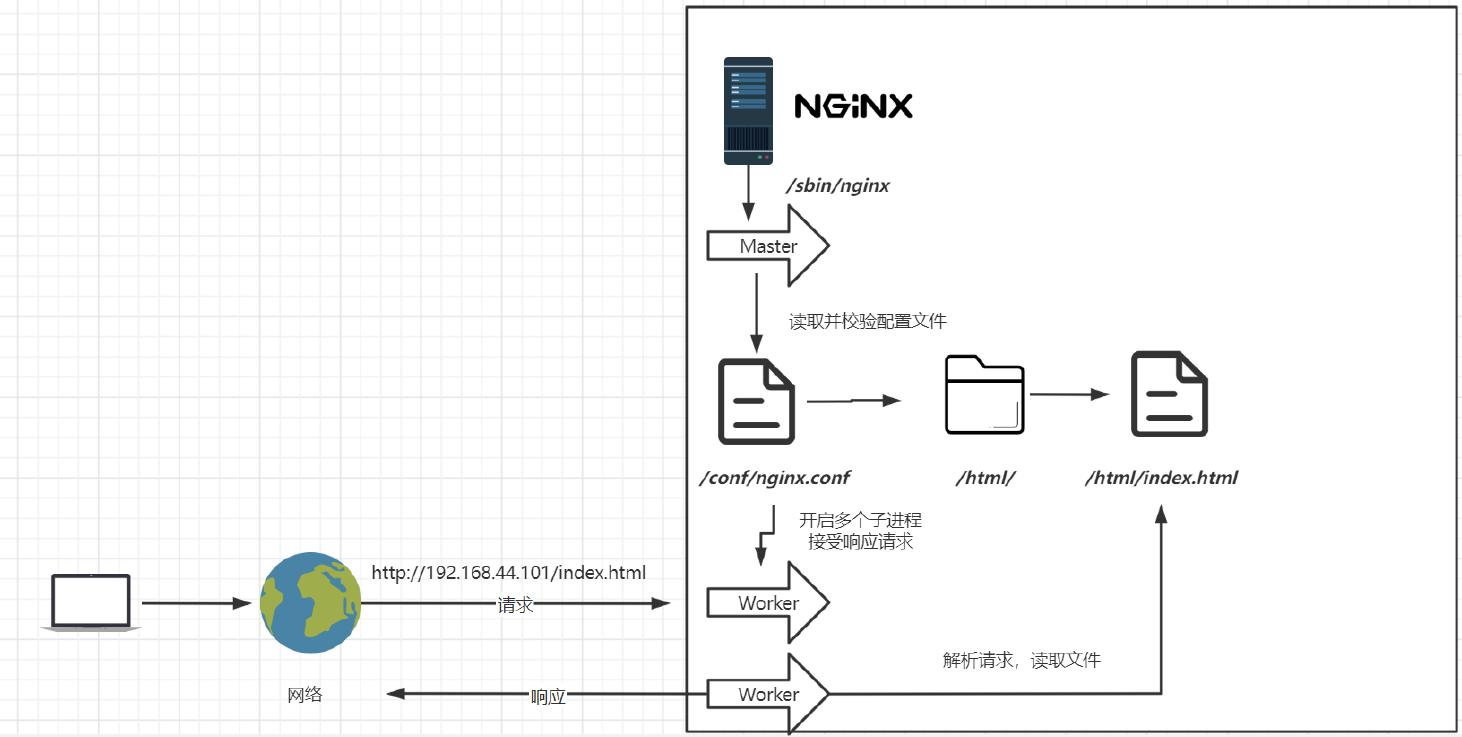
Nginx efficiently serves static content, balances traffic, and proxies requests to keep modern web services fast, scalable, and reliable.
If you have any questions, feel free to comment below. Click the block can copy the code.
And if you think it's helpful to you, just click on the ads which can support this site. Thanks!
Directory Structure #
The Nginx root directory contains the following folders:
client_body_temp conf fastcgi_temp html logs proxy_temp sbin scgi_temp uwsgi_temp
Folders ending in _temp are used to store temporary files generated during operation.
The other main folders are:
- conf: stores configuration-related files
- html: the default directory for static files such as HTML and CSS files
- sbin: the main Nginx executable
- logs: stores various logs. For example,
accessrecords access-related information,errorrecords errors, andnginx.pidrecords the service’s PID, that is, its process ID.
Basic Operating Principles #
Nginx runs multiple processes, including one main process, the Master, which reads and validates configuration files.
The Worker subprocesses handle the corresponding access requests and other requests.
Nginx Configuration and Use Cases #
The primary focus is the Nginx configuration file, nginx.conf. Much of it consists of commented-out configuration, so this section first focuses on the minimal configuration required by Nginx.
#user  nobody;
worker_processes  1;

#error_log  logs/error.log;
#error_log  logs/error.log  notice;
#error_log  logs/error.log  info;

#pid        logs/nginx.pid;


events {
    worker_connections  1024;
}


http {
    include       mime.types;
    default_type  application/octet-stream;

    #log_format  main  '$remote_addr - $remote_user [$time_local] "$request" '
    #                  '$status $body_bytes_sent "$http_referer" '
    #                  '"$http_user_agent" "$http_x_forwarded_for"';

    #access_log  logs/access.log  main;

    sendfile        on;
    #tcp_nopush     on;

    #keepalive_timeout  0;
    keepalive_timeout  65;

    #gzip  on;

    server {
        listen       80;
        server_name  localhost;

        #charset koi8-r;

        #access_log  logs/host.access.log  main;

        location / {
            root   html;
            index  index.html index.htm;
        }

        #error_page  404              /404.html;

        # redirect server error pages to the static page /50x.html
        #
        error_page   500 502 503 504  /50x.html;
        location = /50x.html {
            root   html;
        }

        # proxy the PHP scripts to Apache listening on 127.0.0.1:80
        #
        #location ~ \.php$ {
        #    proxy_pass   http://127.0.0.1;
        #}

        # pass the PHP scripts to FastCGI server listening on 127.0.0.1:9000
        #
        #location ~ \.php$ {
        #    root           html;
        #    fastcgi_pass   127.0.0.1:9000;
        #    fastcgi_index  index.php;
        #    fastcgi_param  SCRIPT_FILENAME  /scripts$fastcgi_script_name;
        #    include        fastcgi_params;
        #}

        # deny access to .htaccess files, if Apache's document root
        # concurs with nginx's one
        #
        #location ~ /\.ht {
        #    deny  all;
        #}
    }


    # another virtual host using mix of IP-, name-, and port-based configuration
    #
    #server {
    #    listen       8000;
    #    listen       somename:8080;
    #    server_name  somename  alias  another.alias;

    #    location / {
    #        root   html;
    #        index  index.html index.htm;
    #    }
    #}


    # HTTPS server
    #
    #server {
    #    listen       443 ssl;
    #    server_name  localhost;

    #    ssl_certificate      cert.pem;
    #    ssl_certificate_key  cert.key;

    #    ssl_session_cache    shared:SSL:1m;
    #    ssl_session_timeout  5m;

    #    ssl_ciphers  HIGH:!aNULL:!MD5;
    #    ssl_prefer_server_ciphers  on;

    #    location / {
    #        root   html;
    #        index  index.html index.htm;
    #    }
    #}
}
Minimal Configuration #
worker_processes #
worker_processes 1; defaults to 1, which means one worker process is started. This corresponds to the number of physical CPU cores on the server: one CPU core corresponds to one worker_processes. The number of worker_processes can also be increased, but doing so on the same CPU requires scheduling and instead reduces efficiency.
Under the events Module #
worker_connections #
worker_connections 1024; specifies the number of connections a single worker process can accept.
Under the http Module #
include mime.types; #
include mime.types; imports HTTP MIME types and adds them to the HTTP header to tell the browser which format it should parse.
For example:
application/octet-stream bin exe dll;
This tells the browser to parse file types such as EXE as a data stream, which means downloading them.
image/jpeg jpeg jpg;
This tells the browser to display the content directly as an image.
default_type application/octet-stream; #
If no mime type matches, the content is transmitted as a binary stream by default.
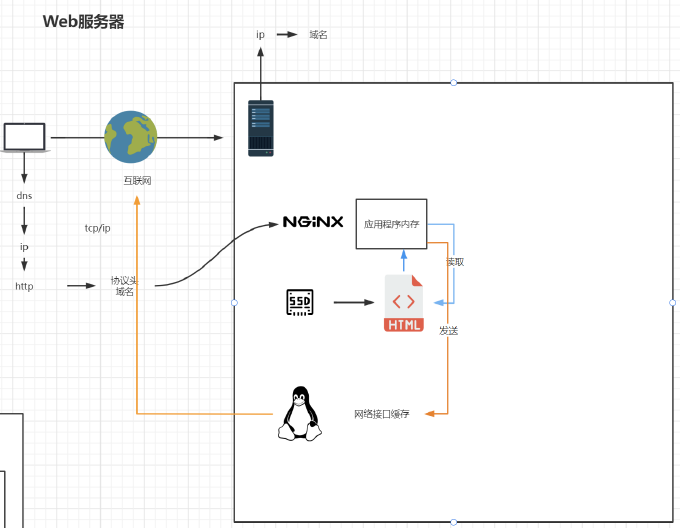
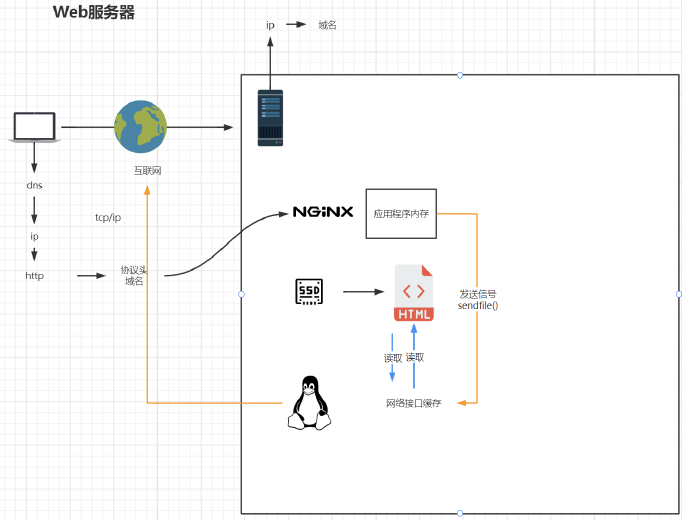
The operating system receives the request, and its network interface forwards the request to Nginx (the port is bound and registered before the request). If sendfile on; is disabled, Nginx first reads the file from the SSD into the application according to the configuration file, and then sends it to the operating system’s network interface (that is, the network card driver). This process goes through scheduling, the network card cache, and the kernel cache, copying data through each layer of caching.
However, if sendfile on; is enabled, Nginx directly sends a signal instructing the network interface to read the file.
keepalive_timeout 65; #
This sets the keep-alive connection timeout, which will be explained in detail in the reverse proxy section.
Under the server Module #
Nginx can be configured with multiple server blocks, and each server is a host.
Virtual host configuration
server {
    listen 80; listening port number
    server_name localhost; host name
    location / { matching path
        root html; document root
        index index.html index.htm; default page name
    }
    error_page 500 502 503 504 /50x.html; error-code-specific page
    location = /50x.html {
        root html;
    }
}
listen 80; #
Each host listens on a different port number, so the hosts do not interfere with one another. Each of these hosts is also called a virtual host (vhost).
server_name localhost; #
The hostname (you must specify a resolvable hostname; for example, the local hosts file defines localhost as 127.0.0.1. You can also replace it with a domain name).
location #
This matches paths and is used to match a URI. A complete link is usually called a URL, such as http://123.com/456/index.html, while the URI is the /456/index.html portion.
root html; #
The file root directory, which is a relative path here.
index index.html index.htm; #
The default page name; here, index is either index.html or index.htm.
error_page 500 502 503 504 /50x.html; #
This maps error codes to the corresponding page. When an error such as 500 is returned, the browser usually redirects automatically to http://123.com/50x.html.
If that page does not exist, the following logic automatically looks for it under root (that is, the html directory).
    location = /50x.html {
        root html;
    }
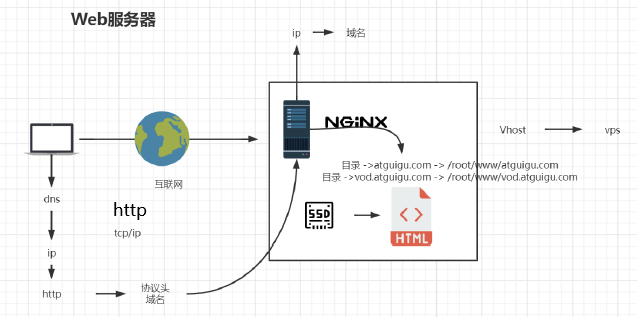
Nginx obtains the IP address from the DNS server and initiates TCP/IP communication. The TCP/IP protocol can transmit only binary data, which is sent to the destination server as a data stream. The HTTP protocol operates on top of the TCP/IP protocol, while the underlying TCP/IP protocol imposes no such constraints. HTTP, however, defines terminators and information such as the exact length of a request message. Another protocol, HTTPS, adds an extra layer of data security on top of HTTP. This is because Internet traffic passes through many gateways, such as a home router, a residential community gateway, a service provider gateway, and finally telecommunications carrier gateways. It passes from district-level gateways to city-level gateways and then nationwide gateways; encryption provides better security throughout this path.
Related readings
If you want to follow my updates, or have a coffee chat with me, feel free to connect with me: