LaTex basic concepts
August 2, 2023 · 10 min read
If you have any questions, feel free to comment below. Click the block can copy the code.
And if you think it's helpful to you, just click on the ads which can support this site. Thanks!
TEX #
TEX is software developed by Donald E. Knuth for typesetting text and mathematical formulas. In 1977, while writing The Art of Computer Programming, Knuth realized that the steadily declining typesetting quality would affect the publication of his work. To reverse this situation, he began developing TEX, tapping into the potential of digital printing equipment that had just begun to be used in the publishing industry at the time. In 1982, Knuth released the TEX typesetting engine, and later improved it in 1989 to better support 8-bit characters and multilingual typesetting. TEX is renowned for its outstanding stability, cross-platform capabilities, and almost bug-free nature. Its version number continuously approaches π, and is currently 3.141592653.
LATEX #
LATEX is a format that uses the TEX program as its typesetting engine, and it can be roughly understood as a layer of encapsulation over TEX. The original design goal of LATEX was to separate content from format, so that authors could focus on content creation rather than layout design, and thereby obtain works with high-quality typesetting. LATEX was initially developed by Dr. Leslie Lamport and is currently maintained by the LATEX Project Team[1]. LATEX is pronounced “Lah-tech” or “Lay-tech,”. LATEX 2ε is the current version of LATEX, meaning that it has gone beyond the second edition but is still far from the third edition, and is written as LaTeX2e in ASCII character environments.
A comparison with Word is meaningless, because TEX is a typesetting engine, LATEX is its encapsulation, while Word is a word processing tool.
Using LATEX for the First Time #
\documentclass{article}
\begin{document}
``Hello world!'' from \LaTeX.
\end{document}
Save the file as helloworld.tex, compilation methods:
- Compile directly with editor software
- Compile using the command line:
pdflatex helloworldorxelatex helloworldIf compilation succeeds, the generatedhelloworld.pdfand some other files can be seen in the directory wherehelloworld.texis located.
Similarly, for Chinese typesetting with LaTex, for example:
\documentclass{ctexart}
\begin{document}
“Hello, world!” Greetings from \LaTeX{}.
\end{document}
The XƎLATEX compilation method needs to be used (note: save the document with UTF-8 encoding; some distributions require the supplementary installation of many packages (such as MiKTEX))
LATEX Commands and Code Structure #
Commands and Environments #
Commands in LATEX begin with a backslash \ and take one of the following two forms:
- A backslash followed by a string of letters, such as
\LaTeX. They are delimited by any non-letter symbol (spaces, numbers, punctuation, etc.). - A backslash followed by a single non-letter symbol, such as
\$LATEX commands are case-sensitive, and letter-form LATEX commands ignore all consecutive spaces that follow them. To manually introduce a space, a pair of braces must be added after the command to prevent it from ignoring the space:\TeX{}. A\command (a backslash followed by a space) can also immediately follow the command, representing the insertion of a space.
Optional arguments are enclosed in square brackets [ ]; mandatory arguments are generally enclosed in braces { } . Some commands can also take an asterisk *, and the effects of commands with and without an asterisk differ to some extent. The asterisk can roughly be regarded as a special optional argument.
LATEX also includes environments, which are used to make certain effects apply locally or to generate special document elements. Some environments allow nested use. A LATEX environment is used with a pair of \begin and \end commands:
\begin{⟨environment name⟩}[⟨optional arguments⟩]{⟨mandatory arguments⟩}
…
\end{⟨environment name⟩}
Some commands (such as \bfseries) affect all content that follows them. To limit their scope, grouping is required. LATEX uses a pair of braces { } as a group, and commands used within a group are limited to that group and do not affect content outside the group.
LATEX Source Code Structure #
LATEX source code begins with a \documentclass command, which specifies the document class used by the document. The content within the Document environment is the document body.
The location between \documentclass and \begin{document} is called the preamble. In the preamble, the \usepackage command is often used to invoke packages, and global document settings are also configured.
\documentclass{...} % ... is a certain document class
% Preamble: usually used to invoke the macro area, as well as for global document settings
\begin{document}
% Body content
\end{document}
% Content after this will be ignored
LATEX Packages and Document Classes #
Document Classes #
A document class specifies the nature of the document that the LATEX source code is to generate—ordinary articles, books, presentations, résumés, and so on. The beginning of LATEX source code must use \documentclass to specify the document class.
\documentclass[⟨options⟩]{⟨class-name⟩}
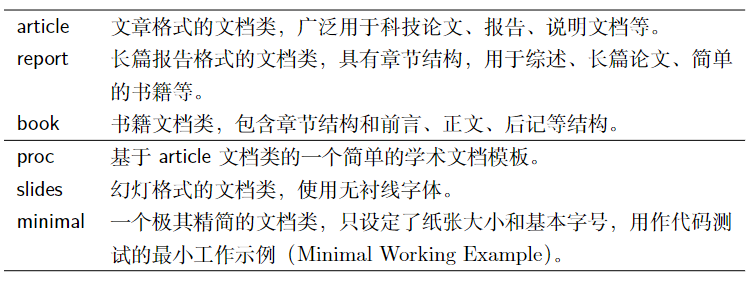
- Here, ⟨class-name⟩ is the name of the document class, such as article, report, and book provided by LATEX; some document classes derived from them, such as ctexart, ctexrep, and ctexbook, which support Chinese typesetting; or some document classes with other functions, such as moderncv, beamer, etc.
- The optional argument ⟨options⟩ specifies options for the document class to globally define some typesetting parameters, such as font size, paper size, single-sided or double-sided, and so on.
For example, invoke the article document class to typeset an article, specifying
A4paper size, a basic font size of 11 pt, and double-sided typesetting:latex \documentclass[11pt,twoside,a4paper]{article}The available options are shown below: 10 pt, 11 pt, 12 ptspecifies the basic font size of the document. The default is 10 pt.a4paper, letterpaper, …specifies the paper size, with the default being American letter paper letterpaper (8.5 in × 11 in, approximately equivalent to 21.6 cm × 28.0 cm). Available options also include a5paper, b5paper, executivepaper, and legalpaper.twoside, onesidespecifies single-sided/double-sided typesetting. In double-sided typesetting, the headers, footers, and margins of odd and even pages are different. article and report default to oneside, while book defaults to twoside.onecolumn, twocolumnspecifies single-column/double-column typesetting. The default is onecolumn.openright, openanyspecifies whether a new chapter\chapterbegins on an odd-numbered page (the right side), or begins directly after the previous page. Report defaults to openany, while book defaults to openright. It has no effect on article.landscapespecifies landscape typesetting. The default is portrait.titlepage, notitlepagespecifies whether the title command\maketitlegenerates a separate title page. Article defaults to notitlepage, while report and book default to titlepage.fleqnmakes displayed formulas left-aligned. The default is center-aligned.leqnoplaces formula numbers on the left. The default is on the right.draft, finalspecifies draft/final mode. In draft mode, places with poor line breaks (overflow) will have a black square added at the end of the line; functions such as illustrations and hyperlinks are also affected by this set of options, as detailed later. The default is final.
Packages #
When using LATEX, it is often necessary to rely on some extensions to enhance or supplement LATEX’s functionality, such as typesetting complex tables, inserting images, adding colors, or even hyperlinks. These extensions are called packages. The method of invoking a package is very similar to that of invoking a document class:
\usepackage[⟨options⟩]{⟨package-name⟩}
\usepackage can invoke multiple packages at once, separated by commas in ⟨package-name⟩. Options generally should not be specified with this usage
% Invoke three packages commonly used for typesetting tables at once
\usepackage{tabularx, makecell, multirow}
Before using packages and document classes, always first confirm whether they are installed on your computer; otherwise, commands such as
\usepackagewill report errors.
Packages may define many commands and environments, or modify LATEX’s existing commands and environments. Their usage instructions are recorded in the help documentation for the corresponding packages and document classes. Simply enter
texdoc ⟨pkg-name⟩in the terminal to consult it.
Overview of Files Used by LATEX #
In addition to source code files with the .tex extension, we may also encounter files in various formats when using LATEX.
.stypackage file. The package name is the same as the filename..clsdocument class file. The document class name is the same as the filename..bibBIBTEX bibliography database file..bstbibliography format template used by BIBTEX.
During the compilation process, in addition to generating documents in .dvi or .pdf format, LATEX may also generate quite a few auxiliary files and logs.
Some functions, such as cross-references, bibliographies, tables of contents, and indexes, require auxiliary files to be generated through compilation first, and then the auxiliary files to be read during another compilation to obtain the correct results, so complex LATEX source code may need to be compiled multiple times:
.loglog file generated by the typesetting engine, used for troubleshooting errors..auxmain auxiliary file generated by LATEX, recording cross-references, tables of contents, bibliography citations, etc..toctable of contents record file generated by LATEX..loflist of figures record file generated by LATEX..lotlist of tables record file generated by LATEX..bblbibliography record file generated by BIBTEX..blglog file generated by BIBTEX..idxindex record file generated by LATEX for processing by makeindex..indformatted index file for typesetting generated by makeindex from processing .idx..ilglog file generated by makeindex..outPDF bookmark record file generated by the hyperref package.
File Organization Method #
When writing long documents, for example, when writing books or graduation theses, a single source file makes revision and proofreading very difficult. Splitting the source file into several files, for example, writing the content of each chapter in a separate file, greatly simplifies revision and proofreading.
LATEX provides the \include command for inserting files into source code:
\include{⟨filename⟩}
⟨filename⟩ is the filename (without the .tex extension). If it is not in the same directory as the main file to be compiled, a relative or absolute path must be added, for example:
\include{chapters/file} % Relative path
\include{/home/Bob/file} % *nix (including Linux, macOS) absolute path
\include{D:/file} % Windows absolute path, using forward slashes
It is worth noting that \include starts a new page before reading ⟨filename⟩. Sometimes we do not need this, and instead use the \input command, which simply inserts the content of the file:
\input{⟨filename⟩}
When there is a lot of content in the preamble, it is often placed separately in a .tex file and then inserted with the \input command.
Complex figures, tables, code, etc. are also handled by similar means. LATEX also provides an \includeonly command for organizing files, which is used in the preamble to specify that only certain files are loaded.
After \includeonly is used in the preamble, \include commands in the body that are not within its list will not take effect:
\includeonly{⟨filename 1⟩,⟨filename 2⟩,…}
It should be noted that filenames loaded using the
\includeand\inputcommands should preferably not contain spaces or special characters, and Chinese names should also be avoided as much as possible; otherwise, errors are very likely to occur.
A practical utility package syntonly. After loading this package, use the \syntaxonly command in the preamble to make LATEX not generate a DVI or PDF document after compilation, but only check for errors, making compilation much faster:
\usepackage{syntonly}
\syntaxonly
% If you want to generate the document, simply use % to comment out the \syntaxonly command.
Terminology and Concepts Related to LATEX and TEX #
- The full name of an engine is a typesetting engine, which is a program that compiles source code and generates documents, such as pdfTEX, XƎTEX, etc. It is sometimes also called a compiler.
- A format is a collection of code that defines a set of commands. LATEX is the most widely used format, and Knuth himself also wrote a simple plain TEX format, which does not define commands such as
\documentclassand\section. - A compilation command is the command that is actually invoked, combining an engine and a format. For example, the xelatex command is a compilation command combining the XƎTEX engine and the LATEX format. The relationship among common engines, formats, and compilation commands is shown below:
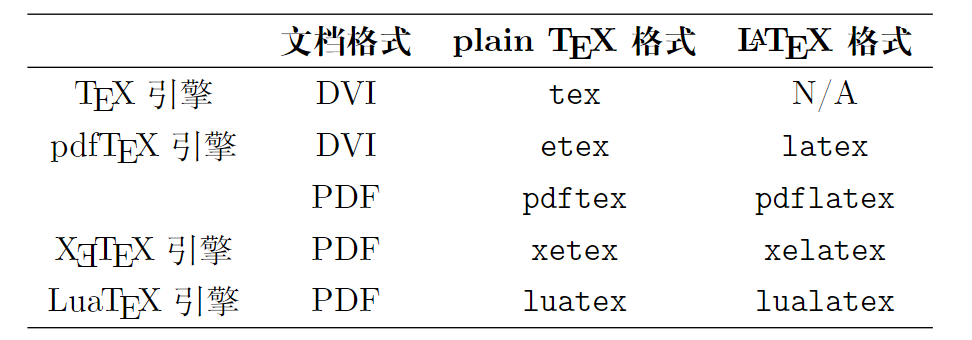
The Latex compilation command and the LATEX format are often easily confused, and need to be made clear when discussing LATEX. To avoid confusion, LATEX in this article always refers to the format, while the compilation command is represented by the monospaced font latex.
Here are the basic characteristics of several compilation commands:
- Although
latexis named the latex command, the engine it invokes underneath is actually pdfTEX. This command generates documents in dvi (Device Inde-pendent) format, which can be converted to pdf using thedvipdfmxcommand. - The engine invoked underneath by
pdflatexis also pdfTEX, and it can directly generate documents in pdf format. - The engine invoked underneath by
xelatexis XƎTEX, which supports UTF-8 encoding and the use of TrueType/OpenType fonts. The currently more convenient Chinese typesetting solution is based on xelatex. - The engine invoked underneath by
lualatexis LuaTEX. This engine was developed on the basis of the pdfTEX engine. In addition to supporting UTF-8 encoding and the use of TrueType/OpenType fonts, it also supports extending TEX’s functionality through the Lua language. Chinese typesetting support under thelualatexcompilation command requires the luatexja package.
References
If you want to follow my updates, or have a coffee chat with me, feel free to connect with me: