JavaScript Operators and Control Flow
July 9, 2021 · 4 min read
If you have any questions, feel free to comment below. Click the block can copy the code.
And if you think it's helpful to you, just click on the ads which can support this site. Thanks!
Commonly used operators in JavaScript include:
- Arithmetic operators
- Increment and decrement operators
- Comparison operators
- Logical operators
- Assignment operators
Arithmetic Operators #
+ 、- 、* 、 / 、%
Floating-Point Precision Issues #
Floating-point numbers have a maximum precision of 17 decimal places, but arithmetic calculations with them are far less precise than with integers.
var result = 0.1 + 0.2; // The result is not 0.3, but 0.30000000000000004
console.log(0.07 * 100); // The result is not 7, but 7.000000000000001
⚠ Therefore, do not directly compare two floating-point numbers for equality!
Increment and Decrement Operators #
Increment (++) and decrement (–) operators are familiar topics, so they need no further explanation here.
Comparison Operators #
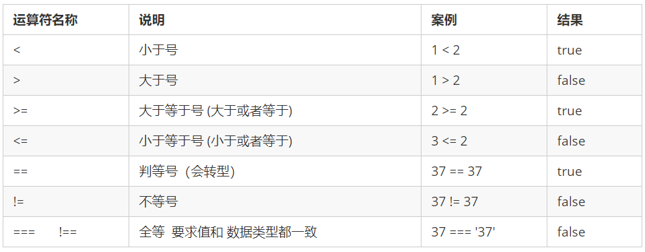
Equality comparison: note the difference between == and ===.

Logical Operators #
Logical operators perform operations on Boolean values and return Boolean values. They are often used later in development to evaluate multiple conditions.

Short-Circuit Evaluation (Logical Interruption) #
Short-circuit evaluation works as follows: when there are multiple expressions (values), if the expression on the left determines the result, the expression on the right is not evaluated.
You will also encounter the following form in development:
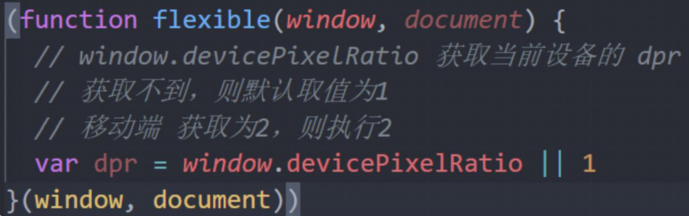
It is similar to setting a default value for a parameter.
Logical AND #
expression1 && expression2
- If the first expression is truthy, return expression 2.
- If the first expression is falsy, return expression 1.
console.log( 123 && 456 ); // 456
console.log( 0 && 456 ); // 0
console.log( 123 && 456&& 789 ); // 789
Logical OR #
expression 1 || expression 2
- If the first expression is truthy, return expression 1.
- If the first expression is falsy, return expression 2.
console.log( 123 || 456 ); // 123
console.log( 0 || 456 ); // 456
console.log( 123 || 456 || 789 ); // 123
Assignment Operators #
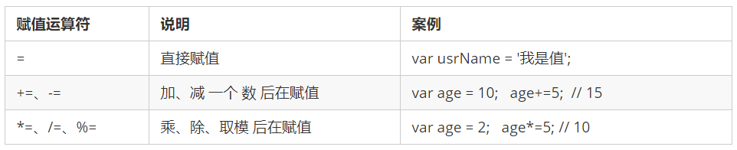
Operator Precedence #
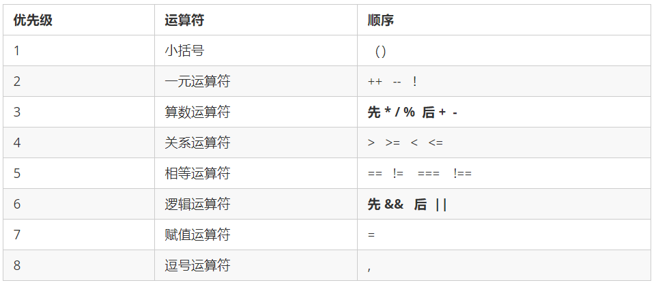
- Logical NOT has a high precedence among unary operators.
- Logical AND has higher precedence than logical OR.
Control Flow #
Control flow has three main structures: sequential, branching, and looping, representing three orders in which code executes.
Branch Statements #
Branching executes different paths of code according to different conditions (selecting one of several paths), producing different results.
if Statements #
// Run the code if the condition is true; otherwise do nothing
if (conditionExpression) {
// Code to run when the condition is true
}

// Run the if block when the condition is true; otherwise run the else block
if (conditionExpression) {
// Code to run when the condition is true
} else {
// Code to run otherwise
}

// Suitable for checking multiple conditions.
if (conditionExpression1) {
// Statement 1
} else if (conditionExpression2) {
// Statement 2
} else if (conditionExpression3) {
// Statement 3
....
} else {
// Run this code if none of the above conditions is true
}
switch Branch Control Flow #
switch( expression ){
case value1:
// Code to run when the expression equals value1
break;
case value2:
// Code to run when the expression equals value2
break;
default:
// Code to run when the expression does not equal any value
}
- The parentheses after the switch keyword can contain an expression or value, usually a variable.
- The case keyword is followed by an option’s expression or value, then a colon.
- The value of the switch expression is compared with the case values in the structure.
- If there is a strict match (
===), the code block associated with that case runs and stops at break, ending the switch statement. - If none of the case values matches the expression’s value, the code in default runs.
- If there is a strict match (
Note: When running statements inside a case, if there is no break, execution continues into the next case.
Ternary Expressions #
expression1 ? expression2 : expression3;
If expression 1 is true, the value of expression 2 is returned; if expression 1 is false, the value of expression 3 is returned.
Breakpoint Debugging #
- Open the browser’s debugging interface (press F12 to open developer tools).
- Go to the Sources tab.
- Select the code file.
- Click the gutter where you want to set a breakpoint.
- Refresh the page, then hover over a code variable to see its current value.
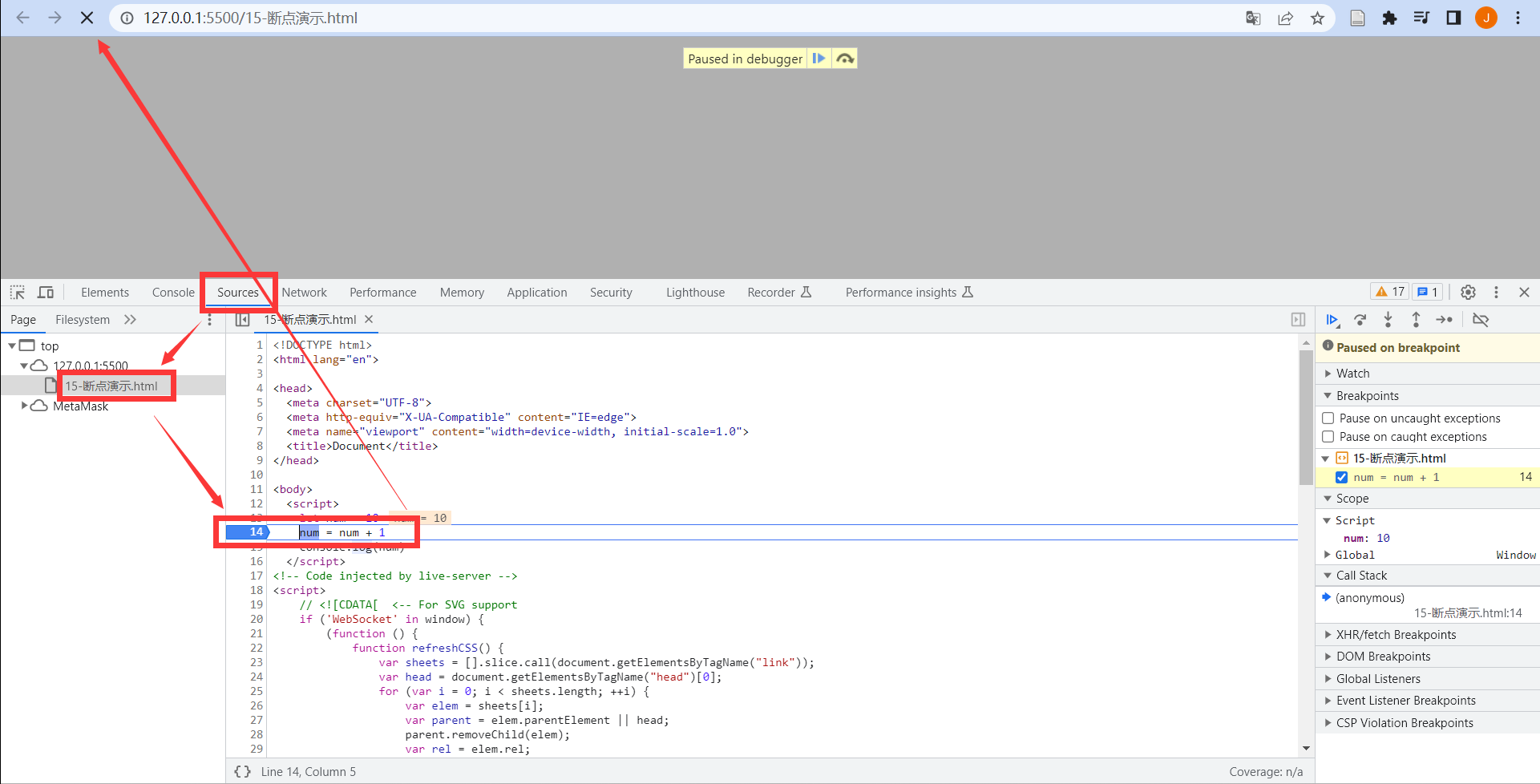 Click step over to execute the next step.
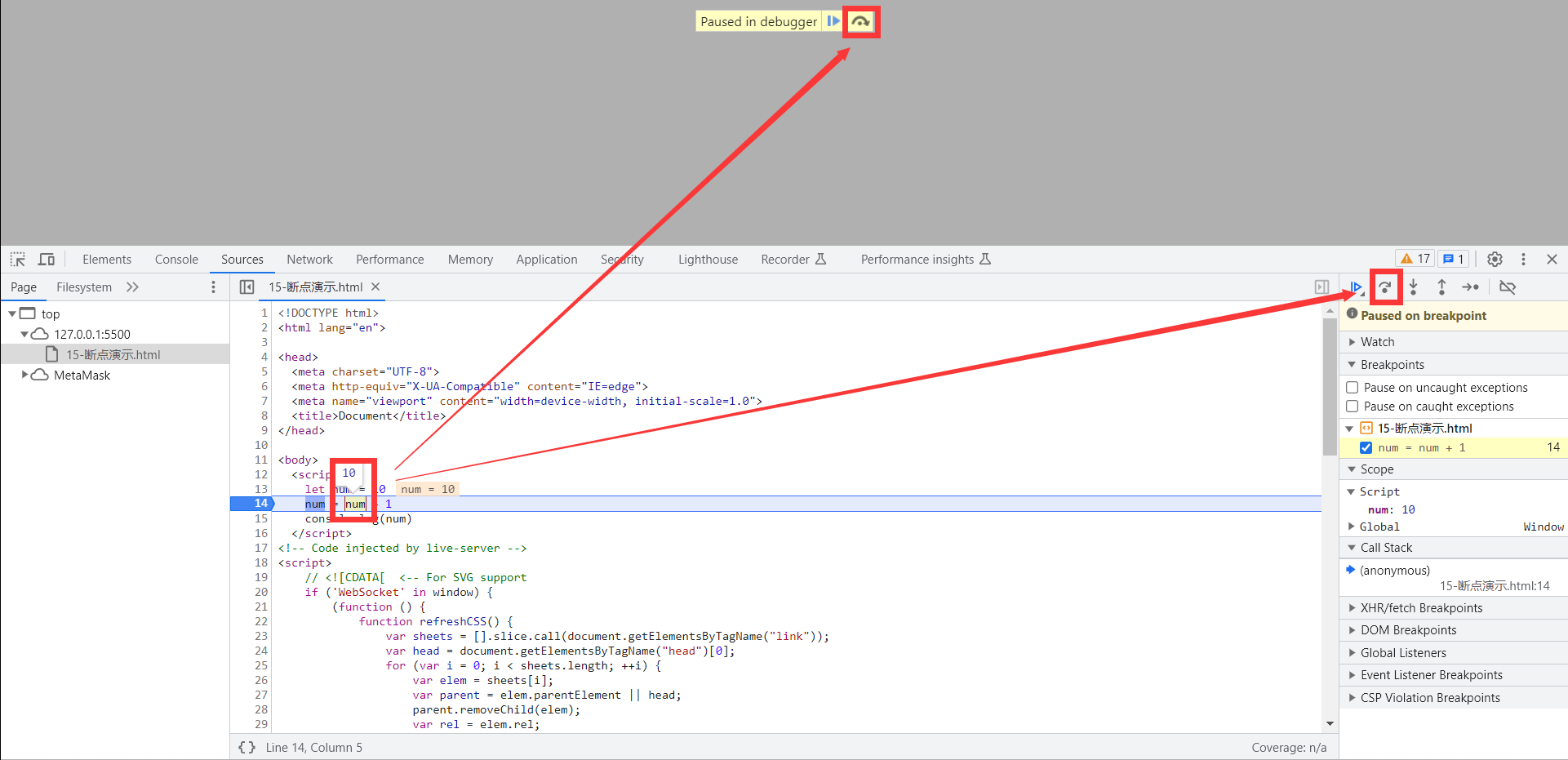 You can also use watch in the right sidebar to add the name of a variable you want to observe and see its value directly.
Loop Statements #
while Loops #
while (conditionExpression) {
   // Loop body
}
Ending a Loop #
break ends the entire loop. It is generally used when the result has already been obtained and further iterations are unnecessary (improving efficiency).
continue ends the current iteration. It is generally used to exclude or skip an option.
Infinite Loops #
- Use while(true) to create an “infinite” loop; use break to exit it. (Common)
- Use for(;;) to create an “infinite” loop; likewise, use break to exit it.
for Statements #
  for(initialValue; terminationCondition; increment) {
  // Code to execute repeatedly
  }
Example: Print stars

 // Print the rows in the outer loop
for (let i = 1; i <= 5; i++) {
    // Print the stars in the inner loop
    for (let j = 1; j <= i; j++) {
        document.write('★')
    }
    document.write('<br>') // Use this method to insert a line break.
}
References
Related readings
If you want to follow my updates, or have a coffee chat with me, feel free to connect with me: