JavaScript Fundamentals
July 7, 2021 · 6 min read
If you have any questions, feel free to comment below. Click the block can copy the code.
And if you think it's helpful to you, just click on the ads which can support this site. Thanks!
Brendan Eich (born 1961) completed the design of JavaScript in 10 days.
- It was originally named LiveScript and was later renamed JavaScript after a collaboration with Sun.
- JavaScript is one of the world’s most popular languages. It is a scripting language that runs on the client side (“script” means a script), and now it can also be used for server-side programming with Node. Js technology.
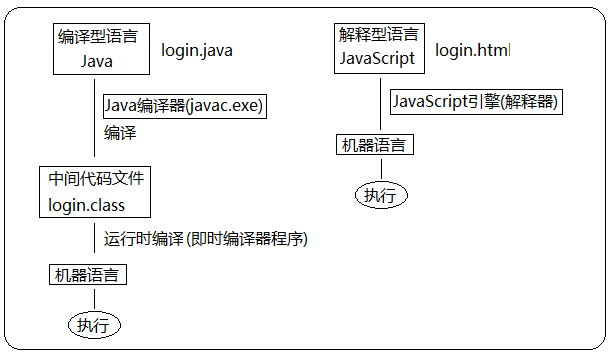
- Scripting language: it does not need to be compiled; during execution, the js interpreter (js engine) interprets and executes it line by line.
What JavaScript Is Used For #
- Dynamic form validation (password strength checking) (the original purpose of JS)
- Web page effects
- Server-side development (Node. Js)
- Desktop applications (Electron)
- Apps (Cordova)
- Hardware control and the Internet of Things (Ruff)
- Game development (cocos 2 d-js)
How Browsers Execute JavaScript #
A browser has two parts: the rendering engine and the JS engine.
- Rendering engine: parses HTML and CSS; commonly called the browser kernel, such as blink in chrome or webkit in older versions.
- JS engine: also called the JS interpreter. It reads and processes JavaScript code on a web page before running it, such as V 8 in chrome. The browser itself does not execute JS code; it uses its built-in JavaScript engine (interpreter) to do so. The JS engine interprets each line of source code (converting it into machine language), which the computer then executes.
Components of JS #
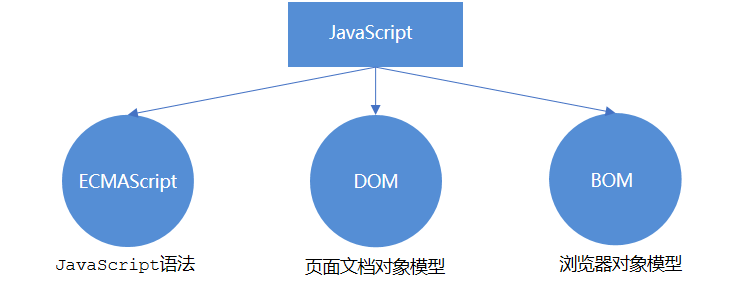
ECMAScript #
ECMAScript is a programming language standardized by ECMA International (formerly the European Computer Manufacturers Association). It is widely used on the World Wide Web and is often called JavaScript or JScript, although the latter two are implementations and extensions of ECMAScript. ECMAScript defines JS programming syntax and core fundamentals; it is an industry standard for JS syntax followed by all browser vendors.
For more, see: https://developer.mozilla.org/zh-CN/docs/Web/JavaScript/JavaScript_technologies_overview[1]
DOM #
The Document Object Model (DOM) is a standard programming interface recommended by the W 3 C for processing extensible markup languages. The interfaces provided by the DOM let you manipulate elements on a page (size, position, color, etc.).
BOM #
The BOM (Browser Object Model) is an object structure independent of page content that allows interaction with the browser window. The BOM lets you manipulate the browser window, such as showing pop-ups, controlling browser navigation, and obtaining the screen resolution.
Where to Write JS #
Inline JS #
<input type="button" value="Click me" onclick="alert('Hello World')" />
- You can write a single line or a small amount of JS in an HTML tag’s event attribute (an attribute beginning with on), such as onclick.
- Pay attention to single and double quotes: double quotes are recommended in HTML, and single quotes are recommended in JS.
Disadvantages
- Poor readability: large amounts of JS written in HTML are hard to read;
- Easy to confuse quotes when matching multiple nested levels of quotation marks;
Embedded JS #
 <script>
	alert('Hello  World~!');
</script>
You can write multiple lines of JS inside a <script> tag; this is commonly used.
External JS File #
<script src="my.js"></script>
This helps structure HTML page code by keeping large sections of JS outside the HTML page and makes reuse at the file level easier. You cannot write code between the tags of a script element that references an external JS file.
Comments #
Single-line comment: //; shortcut: ctrl + /.
Multi-line comment: /* */; change the shortcut to ctrl + shift + /.
Statement Terminators #
In JavaScript, ; marks the end of a piece of code. In most cases, you can omit ; and use a line break (enter) instead.
  <script>
    alert(1);
    alert(2);
    alert(1)
    alert(2)
  </script>
Input and Output Statements #
alert (msg): shows a browser alert box.document.write(): displays content in the page document.console.log(msg): prints information to the browser console.prompt(info): shows a browser input box where the user can enter text.
Variables #
Using a variable involves two steps: 1. Declare the variable. 2. Assign a value (initialize it).
var is a JS keyword used to declare a variable (variable means a value that can vary). After a variable is declared with this keyword, the computer automatically allocates memory for it.
let age; // Declare a variable named age
var age; // Declare a variable named age
To declare multiple variables at once, write var only once and separate the variable names with commas.
let age = 10, name = 'zs', sex = 2;
Both let and var are keywords for declaring variables in JavaScript; using let is recommended!!!
Note: let does not allow the same variable to be declared multiple times.
Declarations with var:
- Can be used before declaration (unreasonable)
- Variables declared with var can be declared again (unreasonable)
- For example, variable hoisting, global variables, and the lack of block scope
Points to note when using
let:
- Redeclaration is not allowed
- Some built-in JavaScript keywords cannot be used as variable names
Special Cases #
| Case | Description | Result |
|---|---|---|
| var age ; console. Log (age); | Declared without assignment | undefined |
| console.Log (age) | Used directly without declaration or assignment | Error |
| age = 10; console. Log (age); | Assigned without declaration | 10 |
Arrays #

Variable Declarations #
There are three ways to declare variables: var, let, and const.
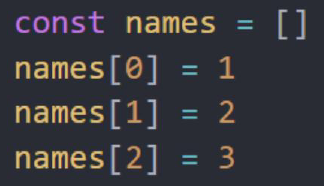
Recommendation: prefer const. Start with const for a variable, and change it to let if you find that it needs to be modified later. A value declared with const cannot be reassigned, and a const variable must be initialized when declared. Declaring arrays and objects with const is recommended.
Can let be changed to const in the following example?
No, because the variable is reassigned.
Yes, because for reference data types, a variable declared with const stores an address, not the value. Adding elements changes the array in the heap at that address stored on the stack, without changing the address it points to.
But the following approach is wrong because the addresses are different:
Consider changing it to:
Variable Naming Conventions #
- Names consist of letters (A-Za-z), digits (0-9), underscores (_), and dollar signs ( $ ), such as usrAge, num 01, and _name.
- Names are case-sensitive. Var app; and var App; are two different variables.
- Names cannot start with a digit. 18 age is incorrect.
- Names cannot be keywords or reserved words, such as var, for, or while.
- Follow camel case: the first letter is lowercase, and the first letter of each subsequent word is uppercase. MyFirstName.
Constants #
When a variable will never change, you can declare it with const instead of let.
const PI = 3.14
Note: Constants cannot be reassigned and must be assigned a value (initialized) when declared.
Interpreted and Compiled Languages #
Identifiers #
An identifier is a name a developer gives to a variable, property, function, or parameter. Identifiers cannot be keywords or reserved words.
Keywords #
Keywords are words already used by JS itself and cannot be used as variable or method names.
They include: break, case, catch, continue, default, delete, do, else, finally, for, function, if, in, instanceof, new, return, switch, this, throw, try, typeof, var, void, while, with, etc.
Reserved Words #
Reserved words are effectively “keywords” set aside for future use: although they are not keywords now, they may become keywords in the future and likewise cannot be used as variable or method names.
They include: boolean, byte, char, class, const, debugger, double, enum, export, extends, Fimal, float, goto, implements, import, int, interface, long, mative, package, Private, protected, public, short, static, super, synchronized, throws, transient, Volatile, etc.
Note: If you use a reserved word as a variable or function name, you may receive no error message unless a future browser implements that reserved word. Once a browser implements it, the word will be treated as a keyword and a keyword error will occur.
References
Related readings
If you want to follow my updates, or have a coffee chat with me, feel free to connect with me: