JavaScript Data Types
July 9, 2021 · 3 min read
If you have any questions, feel free to comment below. Click the block can copy the code.
And if you think it's helpful to you, just click on the ads which can support this site. Thanks!
JavaScript is a weakly typed, or dynamic, language. You do not need to declare a variable’s type in advance; its type is determined automatically while the program runs.
var age = 10; // Number
var areYouOk = 'yes'; // String
JavaScript has dynamic types, meaning the same variable can be used for different types (its type can change).
var x = 6; // x is a number
var x = "Bill"; // x is a string
Classification of Data Types #
- Simple data types (Number, String, Boolean, Undefined, Null) are also called value types. A variable stores the value itself.
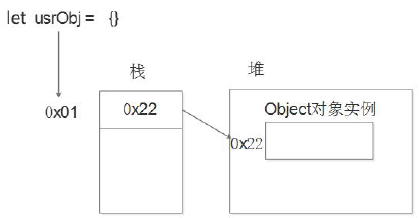
- Complex data types (object) store only an address (reference) in the variable, so they are called reference data types. These include objects created with the new keyword (built-in and custom objects), such as Object, Array, and Date.
Differences in stack and heap allocation:
Stack (operating system): the operating system automatically allocates and releases space for function argument values, local variable values, etc. It works much like the stack data structure; simple data types are stored on the stack.
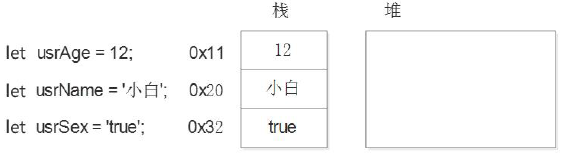
Heap (operating system): stores complex types (objects). Space is generally allocated and released by the programmer; if the programmer does not release it, the garbage collector reclaims it. Reference data types are stored on the heap. A reference variable (on the stack) stores an address; the actual object instance is stored in the heap.
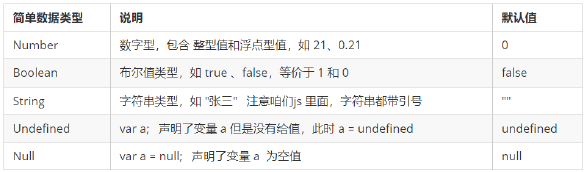
Basic Data Types #
JavaScript’s simple data types are described below:
Number #
JavaScript’s number type can store both integers and decimals (floating-point numbers).
Number Bases #
The most common bases are binary, octal, decimal, and hexadecimal. In JS, octal numbers are prefixed with 0 and hexadecimal numbers with 0x.
var num = 0xA;
var num2 = 012; // Equivalent to decimal 10
Number Range #
The maximum and minimum numeric values in JavaScript:
- Maximum:
Number.MAX_VALUE, whose value is 1.7976931348623157 e+308. - Minimum:
Number.MIN_VALUE, whose value is 5e-32.
Three Special Values #
Infinityrepresents positive infinity and is greater than any numeric value.-Infinityrepresents negative infinity and is less than any numeric value.NaNmeans Not a number and represents a nonnumeric value.
IsNaN () #
Used to determine whether a variable is not a number, returning true or false.
String #
A string can be any text inside quotation marks, using either double quotes "" or single quotes ''.
Because HTML tag attributes use double quotes, we recommend single quotes in JS. JS can nest double quotes inside single quotes.
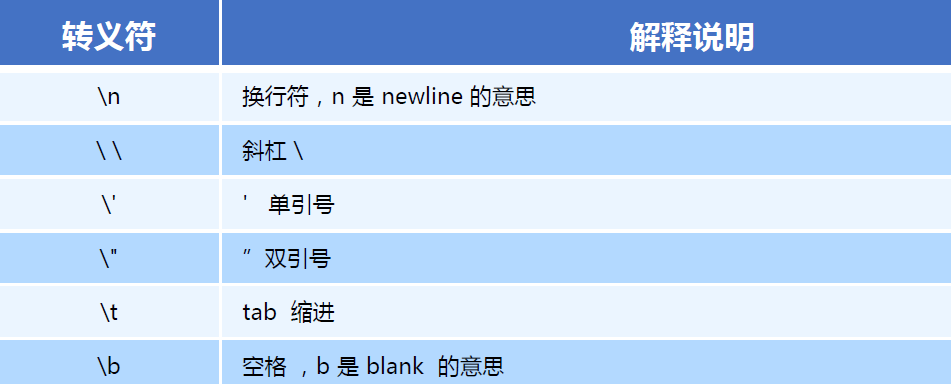
String Escape Characters #
String Length #
You can get the length of a whole string through its length property.
alert(strMsg.length); // show the length of strMsg
String Concatenation #
Multiple strings can be joined with +, as in string + any type = new concatenated string.
console.log('timerring' + age + ' years old'); // timerring18 years old (do not put quotes around a variable, because that turns it into a string)
Boolean #
The Boolean type has two values: true and false. true means true (correct), while false means false (incorrect). When a Boolean is added to a number, true has a value of 1 and false has a value of 0.
Undefined and Null #
A variable that has been declared but not assigned a value has the default value undefined (note the different results when concatenating or adding it).
var variable;
console.log(variable); // undefined
console.log('Hello' + variable); // Helloundefined
console.log(11 + variable); // NaN
console.log(true + variable); // NaN
console.log(NaN +1); //NaN
A variable assigned null stores an empty value.
var vari = null;
console.log('Hello' + vari); // Hellonull
console.log(11 + vari); // 11
console.log(true + vari); // 1
Getting a Variable’s Data Type #
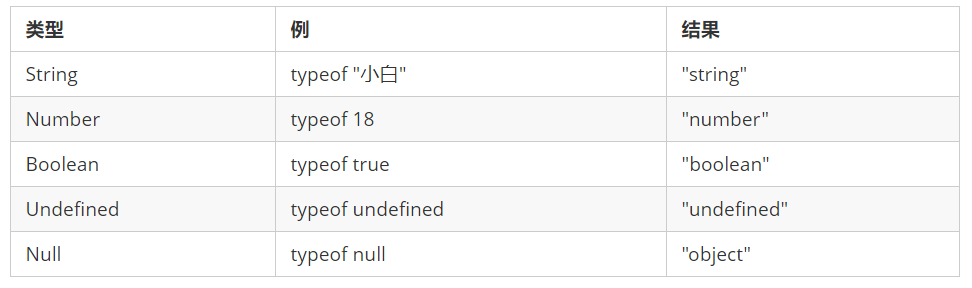
Typeof can be used to detect a variable’s data type.
var num = 18;
console.log(typeof num) // Result: number
Data Type Conversion #
Data obtained from forms and prompt is a String by default. You therefore cannot simply add it directly; you need to convert the variable’s data type.
Converting to a String #
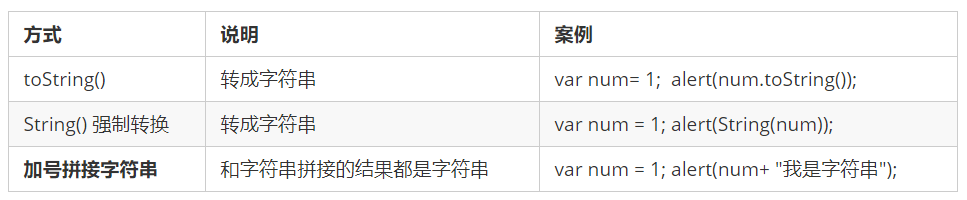
The third method is used more often, for example alert(num + ''), which adds an empty string.
Converting to a Number #
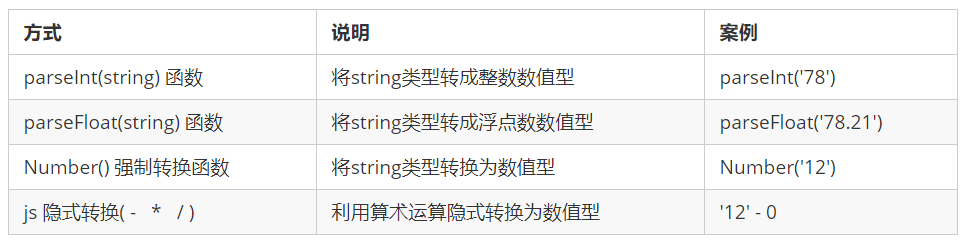
Note: parseInt takes the integer part of a floating-point number directly, discarding its fractional part. Arithmetic operators - * / can perform implicit conversion.
Using + as a unary plus sign can convert a value to a number!!!
console.log(+'123')  // Convert to the number 123
console.log(typeof +'123')  // number
let score = +prompt('Please enter your score') // + converts the input to a number
Converting to a Boolean #

- Empty or negative values are converted to false, such as
'',0,NaN,null, andundefined. - All other values are converted to true.
References
Related readings
- JavaScript Objects
- JavaScript Functions
- JavaScript Arrays
- JavaScript Operators and Control Flow
- JavaScript Fundamentals
If you want to follow my updates, or have a coffee chat with me, feel free to connect with me: