09 Exception Handling
January 11, 2024 · 6 min read
If you have any questions, feel free to comment below. Click the block can copy the code.
And if you think it's helpful to you, just click on the ads which can support this site. Thanks!
1. Differences Between Error and Exception #
An Error is a failure that a program cannot handle, such as OutOfMemoryError or ThreadDeath. When these occur, the Java Virtual Machine (JVM) generally terminates the thread. Such failures are fatal to the program and cannot be caught and handled.
An Exception is an exceptional condition that the program itself can handle. Exceptions fall into two categories: runtime and non-runtime exceptions. Programs should handle these exceptions whenever possible.
2. Exception Class Inheritance #
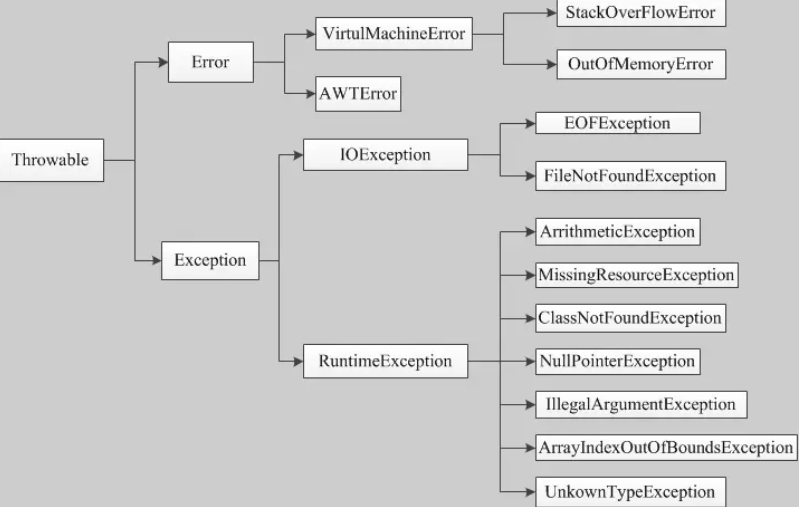
3. Differences Between Runtime and Non-Runtime Exceptions #
Runtime exceptions are RuntimeException and its subclasses, such as NullPointerException and IndexOutOfBoundsException. These are unchecked exceptions: a program may catch and handle them or leave them unhandled. They generally arise from errors in program logic, so the program should avoid them through its logic whenever possible.
Non-runtime exceptions are exceptions other than RuntimeException; they belong to Exception and its subclasses. The language requires them to be handled, or the program will not compile. IOException, SQLException, and user-defined Exception subclasses are checked exceptions. Generally, avoid defining custom checked exceptions. (All checked exceptions must be explicitly handled by catching or throwing them.)
4. Built-in Exception Classes #
Unchecked exceptions
| Exception | Description |
|---|---|
| ArithmeticException | Thrown for an exceptional arithmetic condition, such as integer division by zero. |
| ArrayIndexOutOfBoundsException | Thrown when an array is accessed with an invalid index: a negative index or one greater than or equal to the array size. |
| ArrayStoreException | Thrown when attempting to store an object of the wrong type in an object array. |
| ClassCastException | Thrown when attempting to cast an object to a subclass of which it is not an instance. |
| IllegalArgumentException | Indicates that an illegal or inappropriate argument was passed to a method. |
| IllegalMonitorStateException | Indicates that a thread tried to wait on an object’s monitor, or notify other threads waiting on it, without owning that monitor. |
| IllegalStateException | Signals that a method was called at an illegal or inappropriate time: the Java environment or application is not in the state required for the requested operation. |
| IllegalThreadStateException | Thrown when a thread is not in the state required for the requested operation. |
| IndexOutOfBoundsException | Indicates that an index, such as one into an array, string, or vector, is out of range. |
| NegativeArraySizeException | Thrown when an application attempts to create an array with a negative size. |
| NullPointerException | Thrown when an application tries to use null where an object is required. |
| NumberFormatException | Thrown when an application tries to convert a string to a numeric type but the string is not in a suitable format. |
| SecurityException | Thrown by a security manager to indicate a security violation. |
| StringIndexOutOfBoundsException | Thrown by a String method to indicate that an index is negative or exceeds the string’s length. |
| UnsupportedOperationException | Thrown when the requested operation is not supported. |
Checked exceptions:
| Exception | Description |
|---|---|
| ClassNotFoundException | Thrown when an application attempts to load a class but cannot find it. |
| CloneNotSupportedException | Thrown when Object.clone is called but the object’s class does not implement Cloneable. |
| IllegalAccessException | Thrown when access to a class is denied. |
| InstantiationException | Thrown when Class.newInstance attempts to create an instance of a class that cannot be instantiated because it is an interface or an abstract class. |
| InterruptedException | Thrown when one thread is interrupted by another. |
| NoSuchFieldException | The requested field does not exist. |
| NoSuchMethodException | The requested method does not exist. |
5. Built-in Exception Methods #
Exceptions have many APIs.
| Method | Description |
|---|---|
| public String getMessage() | Returns details about the exception. This message is initialized in the Throwable constructor. |
| public Throwable getCause() | Returns a Throwable representing the cause of the exception. |
| public String toString() | Returns a brief description of this Throwable. |
| public void printStackTrace() | Prints this Throwable and its backtrace to the standard error stream (in stack order). |
| public StackTraceElement [] getStackTrace() | Returns an array of stack frames. Element 0 is the top of the stack; the last element is the bottom of the method call stack. |
| public Throwable fillInStackTrace() | Fills in the Throwable’s stack trace with the current call stack, adding to any prior stack information. |
6. Catching Exceptions #
import java.util.Scanner;

public class Main {

    private static void foo() {
        int[] array = new int[5];
        for (int i = 0; i < 5; i ++ )
            array[i] = i;

        Scanner sc = new Scanner(System.in);
        int k = sc.nextInt();
        int x = sc.nextInt();

        try {
            array[k] /= x;
        } catch (ArithmeticException e) {
            System.out.println("除零错误!");
            // The API prints error details: / by zero            System.out.println(e.getMessage());
            // The API prints the error stack trace
            // Note: printing after catching does not terminate the program. Without a catch, the error is printed similarly, but the program terminates.
            e.printStackTrace();
        } catch (ArrayIndexOutOfBoundsException e) {
            System.out.println("数组越界!");
            e.printStackTrace();
            // Code that runs whether or not an exception is caught can go in finally
            // Even if catch contains return, finally runs before returning (statements after finally then do not run).
        } finally {
            for (int i = 0; i < 5; i ++ ) {
                System.out.println(array[i]);
            }
        }
//        System.out.println("程序执行完毕!");
    }

    public static void main(String[] args) {
        foo();
    }
}
7. Throwing Exceptions #
throw: Throws an exception inside a function.
throws: Declares possible exceptions in a function definition.
Checked exceptions must be caught or thrown. Exception handling can be nested: put a try/catch inside a try or catch block.
import java.io.IOException;
import java.util.Scanner;

public class Main {

    // Declare multiple exceptions with throws
    private static void foo() throws IOException, NoSuchFieldException {
        Scanner sc = new Scanner(System.in);
        int x = sc.nextInt();
        if (x == 1)
            throw new IOException("找不到文件!!!");
        else            throw new NoSuchFieldException("自定义异常");
    }

    public static void main(String[] args) {
        try {
            // We throw an exception ourselves
            foo();
        } catch (IOException e) {
            // Then we catch that exception ourselves
            // Alternatively, main could throw it to the virtual machine
            System.out.println("IOException!");
            e.printStackTrace();
        } catch (NoSuchFieldException e) {
            System.out.println("NoSuchFieldException!");
            e.printStackTrace();
        }
    }
}
8. try-with-resources #
Since JDK 7, Java has provided try-with-resources syntax to open resources and ensure that each is closed automatically after the statement completes.
try declares and instantiates resources; catch handles any exceptions that may arise when closing them.
import java.io.*;

public class Main {

    public static void main(String[] args) {
        String line;
        try (
                BufferedReader br = new BufferedReader(new FileReader("input.txt"));
                BufferedWriter bw = new BufferedWriter(new FileWriter("output.txt"));
        ) {
            while ((line = br.readLine()) != null) {
                System.out.println("Line => " + line);
                bw.write("copy: " + line + "\n");
            }
            bw.flush();
        } catch (IOException e) {
            System.out.println("IOException in try block =>" + e.getMessage());
        }
    }
}
Related readings
If you want to follow my updates, or have a coffee chat with me, feel free to connect with me: