How to Add Commits to Someone Else's Pull Request
January 3, 2025 · 0 min read
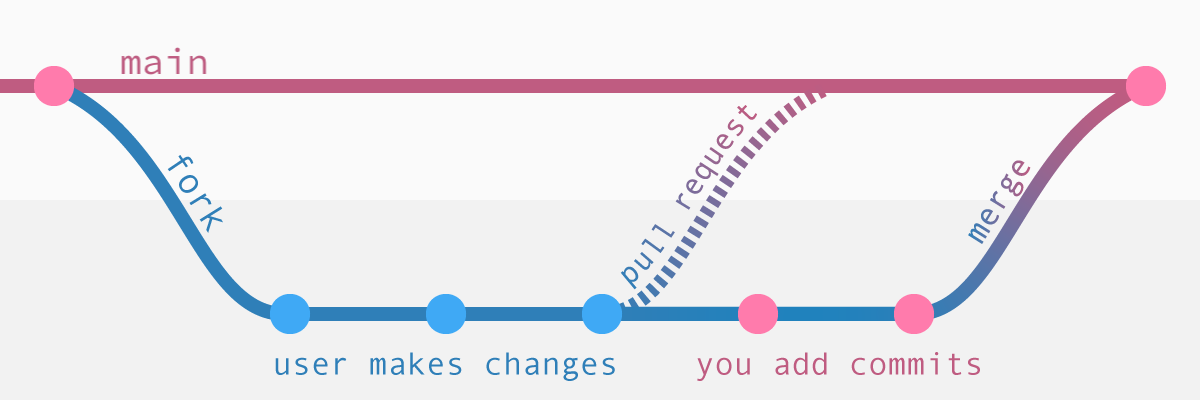
Reference: https://tighten.com/insights/adding-commits-to-a-pull-request/
If you have any questions, feel free to comment below. Click the block can copy the code.
And if you think it's helpful to you, just click on the ads which can support this site. Thanks!
Most of time, we need to reply the commiter to adjust some code, sometimes it’s not efficient. Instead, we can directly add the commit to the PR.
Pure git #
In order to see the other user’s fork (and push commits to it), you’ll add their fork as a remote to your local repo.[1]
git remote add arthurdent [email protected]:arthurdent/the-guide.git
# git remote -v

# Then fetch the new remote
git fetch arthurdent

# Check the branch local
git checkout -b arthurdent-main arthurdent/main

# Then you make your changes and commit as normal
git push arthurdent HEAD:main
# Alternative
# git push arthurdent arthurdent-main:main
Tips: if you have encounter this:
! [remote rejected] HEAD -> main (permission denied)The others may unchecked the box “Allow edits from maintainers.” when fork the Repo. So have them check the box in the PR view and try again.
Gh cli #
Also you can also use the gh cli to complete the above steps.
gh pr checkout 1234
git remote add arthurdent [email protected]:arthurdent/the-guide.git
git push arthurdent HEAD:main
Related readings
If you want to follow my updates, or have a coffee chat with me, feel free to connect with me: