Git Cheatsheet
January 7, 2025 · 4 min read
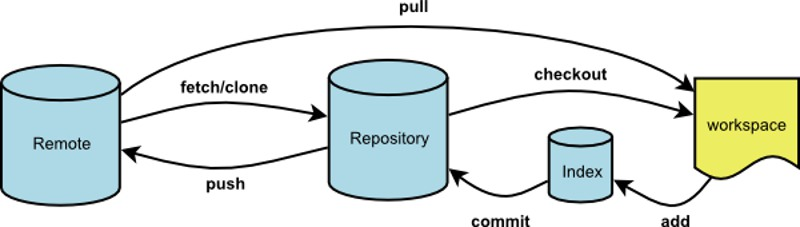
Git workflow diagram from https://www.slideshare.net/slideshow/a-tutorial-for-githubpdf/263768052
If you have any questions, feel free to comment below. Click the block can copy the code.
And if you think it's helpful to you, just click on the ads which can support this site. Thanks!
This is a Git cheatsheet that distills my years of experience.
- Workspace: The directory of the repository. The working directory is independent of each branch.
- Staging Area (Index): A temporary area for data, similar to a cache before writing from the working directory to the repository. The staging area is independent of each branch.
- Repository: Stores all code versions that have been committed to the local repository.
- Version Structure: A tree structure where each node represents a code version.
Configuration #
--globalwill be recorded in the~/.gitconfigfile
Automatically clean up branch references that have been deleted remotely.
git config --global fetch.prune true
Set the global user name and email.
git config --global user.name xxx
git config --global user.email [email protected]
Set the default text editor to vim.
git config --global core.editor vim
Common #
Basics #
git init: Initialize the current directory as a git repository, with information stored in the hidden .git foldergit clone [email protected]:xxx/xxx.git: Clone the remote repository to the current directorygit status: Check the repository statusgit log: View all commits on the current branchgit log --oneline -n: Show the last n commits in one line
git add xx: Add file xx to the staging area (works for both additions and deletions)git add .: Add all pending files to the staging area
git rm --cached xx: Remove file from the repository index (makes the fileuntracked)git diff xx: View changes in file xx compared to the staging areagit stash: Save uncommitted changes from working directory and staging area to a stackgit stash list: View all stashed entriesgit stash pop: Apply the top stashed changes to the current branch and remove it from the stack (pop = apply + drop)git stash drop: Remove the top stashed entry
git restore xx: Discard all unstaged changes in file xx (similar to revert)git restore --staged filename: Unstage a file (restore the staging area to match HEAD)
Commit #
git commit -m "message": Commit staged content to the current branch- feat - New feature, corresponds to semantic versioning MINOR
- fix - Bug fix, corresponds to semantic versioning PATCH
- docs - Documentation
- style - Code formatting changes that don’t affect code execution (e.g., spaces, formatting, missing semicolons)
- refactor - Code refactoring, neither adding features nor fixing bugs
- perf - Performance optimization related commits
- test - Adding or modifying test code
- build - Changes to build system or external dependencies
- ci - Changes to CI configuration files and scripts
- chore - Changes to build process or auxiliary tools
- revert - Revert a previous commit
git commit --amend: Modify the last commit messagegit reset --hard/soft HEAD^: Roll back the repository to the previous version--hardHard reset discards staged changes as well--softKeeps staged changes (only undoes the commit)HEAD^One version backHEAD^^Two versions backHEAD~One version backHEAD~100100 versions backgit reset --hard <commit-hash>: Roll back to a specific version (the version before the one you want to delete)
branch #
git branch: View all branches and the current branchgit branch -a: View all branches (including remote branches)git branch -r: View all remote branchesgit branch -m old_name new_name: Rename a branchgit branch -d branch_name: Delete thebranch_namebranch from local repository (must be merged)git branch -D branch_name: Force delete thebranch_namebranch from local repositorygit branch branch_name: Create a new branch
git checkout -b branch_name: Create and switch to thebranch_namebranchgit checkout branch_name: Switch to thebranch_namebranchgit merge branch_name: Merge branchbranch_nameinto the current branch Note: This merge is a fast-forward merge. If conflicts occur, you need to manually open the file to resolve them. The content above belongs to the HEAD branch, and the content below belongs to the branch being merged. Delete the<< == >>markers and keep whichever content you want.<<<<<<< HEAD XXX ======= YYY >>>>>>> devgit remote set-url origin xxxxxChange remote url- ==
git remote rm origin+git remote add origin [email protected]:xxx/XXX.git
- ==
push and pull #
git push -u: Push the current branch to the remote repository. The-uflag is only needed the first time.git push origin branch_name: Push a specific local branch to the remote repository.git push -f origin branch_name: Force push a specific local branch to the remote repository.git push -d origin branch_name: Delete thebranch_namebranch from the remote repository.git pull: Merge the current branch of the remote repository with the current branch of the local repository (git fetch origin main+git merge FETCH_HEAD).git pull --rebase==git fetch origin main+git rebase FETCH_HEADgit pull origin branch_name: Merge thebranch_namebranch from the remote repository with the current branch of the local repository.
git checkout -t origin/branch_name: Pull the remotebranch_namebranch to local and track it.git rebase -i HEAD~nEdit commits.- Details in How to Merge Multiple Commit to the One.
PR related #
Less Common #
git fetch origin maingit log -p FETCH_HEADShow the changes of the fetched headgit reflog: View the movement history of the HEAD pointer (including rolled-back versions), displays abbreviated commit hashes (first 7 characters of each version’s hash)
Example #
Clear all history of the Git repository, replace the main branch with a brand new commit, and then force push to the remote repository to overwrite the original content.
git checkout --orphan brandnewbranch
git add commit...
git branch -D main
git branch -m main # adjust the name of current branch
git remote set-url origin xxxxx # reassign the remote url
git push -f origin main
Related readings
If you want to follow my updates, or have a coffee chat with me, feel free to connect with me: