Merging Data Frames
August 19, 2023 · 4 min read
If you have any questions, feel free to comment below. Click the block can copy the code.
And if you think it's helpful to you, just click on the ads which can support this site. Thanks!
Sometimes datasets come from multiple places, and we need to merge two or more datasets into one dataset. Operations for merging data frames include vertical merging, horizontal merging, and merging by a shared variable.
1. Vertical merging: rbind( ) #
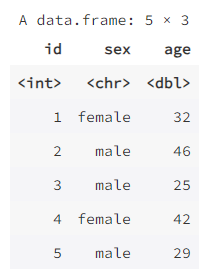
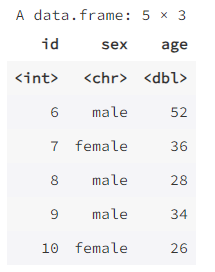
To merge two data frames vertically, you can use the rbind( ) function. The two data frames being merged must have the same variables, and this kind of merging is usually used to add observations to a data frame. For example:
data1 <- data.frame(id = 1:5,
                    sex = c("female", "male", "male", "female", "male"),
                    age = c(32, 46, 25, 42, 29))
data1
data2 <- data.frame(id = 6:10,
                    sex = c("male", "female", "male", "male", "female"),
                    age = c(52, 36, 28, 34, 26))
data2
rbind(data1, data2)
2. Horizontal merging: cbind ( ) #
To merge two data frames horizontally, you can use the cbind( ) function. The two data frames used for merging must have the same number of rows and must be arranged in the same order. This kind of merging is usually used to add variables to a data frame. For example:
data3 <- data.frame(days = c(28, 57, 15, 7, 19),
                    outcome = c("discharge", "dead", "discharge", "transfer", "discharge"))
data3

cbind(data1, data3)
3. Merging by a shared variable: merge( ) #
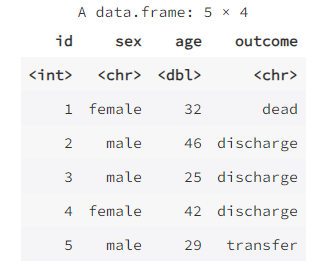
Sometimes we have multiple related datasets that have one or more shared variables, and we want to merge them into one large dataset by the shared variables. The function merge( ) can accomplish this, for example:
data4 <- data.frame(id = c(2, 1, 3, 5, 4),
                    outcome = c("discharge", "dead", "discharge", "transfer", "discharge"))
data4

mydata <- merge(data1, data4, by = "id")
mydata
full_join( ) #
The full_join( ) function in the dplyr package can also accomplish the above function. The command above is equivalent to:
options(warn=-1) # Clean display
library(dplyr)
mydata <- full_join(data1, data4, by = "id")
mydata
The dplyr package provides various functions for merging data frames, such as bind_rows( ), bind_cols( ), left_join( ), right_join( ), and so on. You can consult the help documentation[1] for these functions to learn how to use them.
4. Converting between long and wide formats of data frames #
The function reshape( ) in the base package can convert data between long and wide formats.
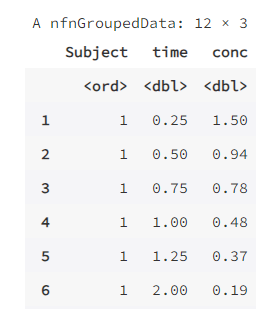
The following uses the dataset Indometh in the datasets package as an example. This dataset contains pharmacokinetic data for the drug indometacin. There are 6 experimental subjects in total, and the drug concentration in the blood of each experimental subject was measured at regular intervals over 8 consecutive hours, with 11 measurements in total. These data are in long format, and they are converted to wide format below.
data(Indometh)
head(Indometh,12) # Add one line here to preview the first 12 rows of data for convenient comparison
wide <- reshape(Indometh, v.names = "conc", idvar = "Subject", timevar = "time", direction = "wide")
wide
Indometh: This is a data frame or dataset representing the original data to be reshaped.v.names: This is a string representing the name of the value variable to be reshaped. In this case,"conc"represents the concentration variable in the original data.idvar: This is a string or vector representing the name of the identifier variable or a list of variables. In this case,"Subject"represents the subject identifier variable in the original data.timevar: This is a string representing the name of the time variable. In this case,"time"represents the time variable in the original data.direction: This is a string representing the direction of reshaping. In this case,"wide"indicates that the data are to be reshaped from long format to wide format.
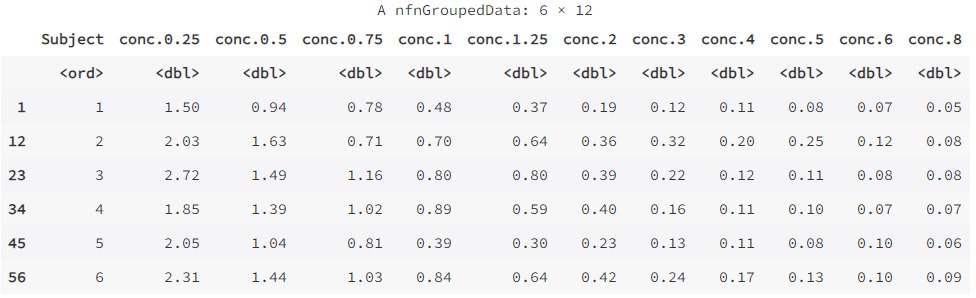
We can also convert the wide-format data wide back to long format:
long <- reshape(wide, idvar = "Subject", varying = list(2:12),
        v.names = "conc", direction = "long")
head(long, 12)
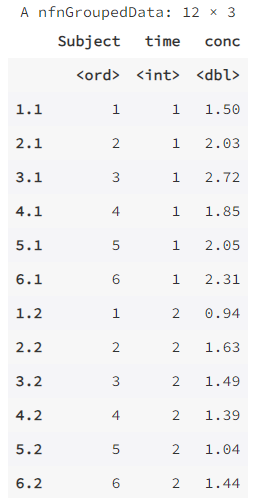
The function reshape( ) is powerful, but it has many parameters, making it somewhat inconvenient to use.
The tidyr package converts data between long and wide formats using a relatively concise and consistent format. The function pivot_wider( ) is used to convert long-format data to wide format, while the function pivot_longer( ) is used to convert wide-format data to long format. The results above can also be obtained with the following commands:
library(tidyr)
wide <- pivot_wider(as.data.frame(Indometh),
                    names_from = time,
                    values_from = conc)
wide
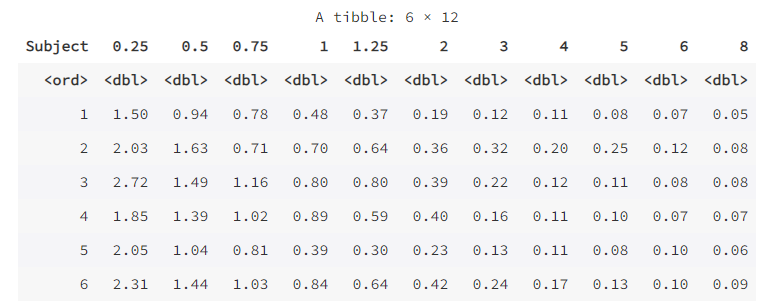
Note that in the function pivot_wider( ) above, we used the function as.data.frame( ) to convert the data Indometh into a data frame, because its default type is not a data frame. The data frame wide can also be converted back to long format:
long <- pivot_longer(wide, -Subject,
                     names_to = "time", values_to = "conc")
long
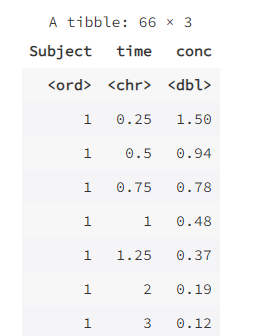
A “tidy” dataset (tidy data) should satisfy the following: each row represents an observation, and each column represents a variable. Before analyzing medical data, the dataset should usually be converted to long format first, because most functions in R support data in this format.
The gather() and spread() functions in the tidyr package can likewise be used to convert between long-form and wide-form data types. See Cookbook for R[2] for details.
References
Related readings
If you want to follow my updates, or have a coffee chat with me, feel free to connect with me: