Building a RAG Chatbot with NVIDIA AI Endpoints
August 18, 2024 · 20 min read
基于 NVIDIA AI Endpoint、LangChain 和 FAISS 构建 RAG 智能对话机器人,实践商品问答与检索增强生成。
...基于 NVIDIA AI Endpoint、LangChain 和 FAISS 构建 RAG 智能对话机器人,实践商品问答与检索增强生成。
...Scalar variables are denoted by ordinary lowercase letters (for example, $x$, $y$, and $z$). $\mathbb{R}$ denotes the space of all (continuous) real-valued scalars, and $x\in\mathbb{R}$ is the formal way to say that $x$ is a real-valued scalar. A scalar is represented by a tensor with only one element.
...The data is stored in the CSV (comma-separated values) file ../data/house_tiny.csv.
import os

os.makedirs(os.path.join('..', 'data'), exist_ok=True)
data_file = os.path.join('..', 'data', 'house_tiny.csv')
with open(data_file, 'w') as f:
    f.write('NumRooms,Alley,Price\n')  # Column names
    f.write('NA,Pave,127500\n')  # Each row represents one data sample
    f.write('2,NA,106000\n')
    f.write('4,NA,178100\n')
    f.write('NA,NA,140000\n')

# To load the raw dataset from the CSV file we created, import `pandas` and call `read_csv`.
# !pip install pandas
import pandas as pd

data = pd.read_csv(data_file)
print(data)

#    NumRooms Alley   Price
# 0       NaN  Pave  127500
# 1       2.0   NaN  106000
# 2       4.0   NaN  178100
# 3       NaN   NaN  140000
An $n$-dimensional array is also called a tensor. Regardless of the deep learning framework, its tensor class (ndarray in MXNet and Tensor in PyTorch and TensorFlow) is similar to NumPy’s ndarray.
During deep learning training, we usually do not read images one at a time. Instead, we might read 128 images at once. This is a batch, represented by a four-dimensional array.
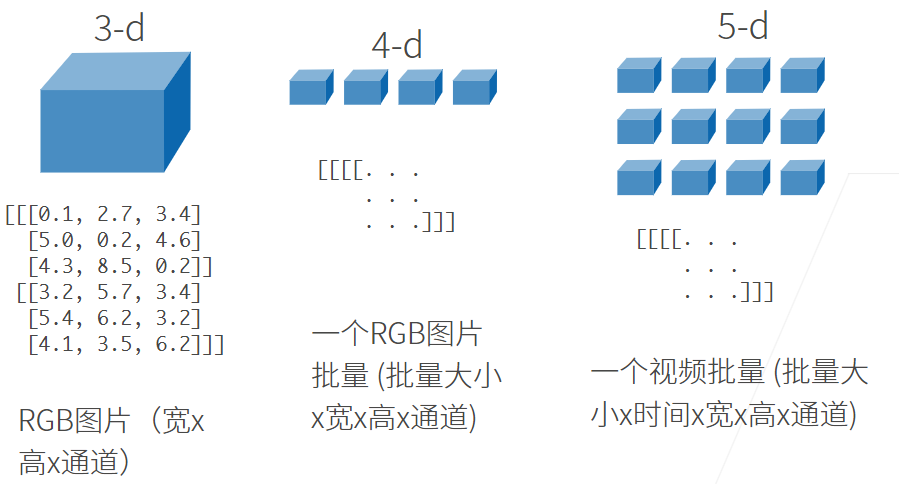 Deep learning frameworks also offer important features beyond NumPy’s
ndarray:
...A tensor with one axis corresponds to a mathematical vector; A tensor with two axes corresponds to a mathematical matrix.
Since R is mainly used for data analysis, import files are more commonly used than export files, but sometimes we also need to export data or analysis results. The functions write.table( ) and write.csv( ) can export data to a .txt file and a .csv file, respectively.
In addition, the function save( ) can save the specified object in the workspace as an R data file with the extension .rdata. For example:
ID <- 1:5
sex <- c("male", "female", "male", "female", "male")
age <- c(25, 34, 38, 28, 52)
pain <- c(1, 3, 2, 2, 3)
pain.f <- factor(pain, levels = 1:3, labels = c("mild", "medium", "severe"))
patients <- data.frame(ID, sex, age, pain.f)
save(patients, file = "patients.rdata")

# IMPORT DATA
load("patients.rdata")
the rdata format file takes up less space and loads quickly with R. Therefore, it is recommended that users ** save data in rdata format ** after importing and organizing data in other formats. To import data in this format, simply call the load( ) function.
In real-world problems, data analysts may face datasets with hundreds of thousands of records and hundreds of variables. Processing such large datasets requires a relatively large amount of computer memory, so use a 64-bit operating system and a device with relatively large memory whenever possible. Otherwise, data analysis may take too long or may even be impossible to carry out. In addition, effective strategies for processing data can greatly improve analysis efficiency.
...Approach 1: Extend the Thread class.
class Worker extends Thread {
    @Override
    public void run() {
        for (int i = 0; i < 10; i ++ ) {
            System.out.println("Hello! " + this.getName());
            try {
                Thread.sleep(1000);
            } catch (InterruptedException e) {
                throw new RuntimeException(e);
            }
        }
    }
}

public class Main {
    public static void main(String[] args) {
        Worker worker1 = new Worker();
        Worker worker2 = new Worker();
        worker1.setName("thread-1");
        worker2.setName("thread-2");
        worker1.start();
        worker2.start();
    }
}
(1) Annotations, also called metadata, describe packages, methods, fields, constructors, local variables, and other program elements.
(2) Annotations do not affect program logic, but can be processed at compile time or runtime.
(3) In Java SE, annotations serve relatively simple purposes, such as marking obsolete features or suppressing warnings. In Java EE, they play a more important role, such as configuring aspects of an application in place of the verbose code and XML configuration left over from older Java EE versions.
An Error is a failure that a program cannot handle, such as OutOfMemoryError or ThreadDeath. When these occur, the Java Virtual Machine (JVM) generally terminates the thread. Such failures are fatal to the program and cannot be caught and handled.
An Exception is an exceptional condition that the program itself can handle. Exceptions fall into two categories: runtime and non-runtime exceptions. Programs should handle these exceptions whenever possible.
...Interface: java.util.List<>.
Implementations:
java.util.ArrayList<>: resizable arrayjava.util.LinkedList<>: doubly linked listMethods:
add(): add an element at the endclear(): clear the listsize(): return its lengthisEmpty(): check whether it is emptyget(i): get the ith elementset(i, val): set the ith element to valLoop syntax:
// Standard
for(int i = 0; i < list.size(); i ++) {
    System.out.println(list.get(i));
}
// Enhanced
for (Integer integer : list) {
    System.out.println(integer);
}